Sensecape: Enabling Multilevel Exploration and Sensemaking with Large Language Models
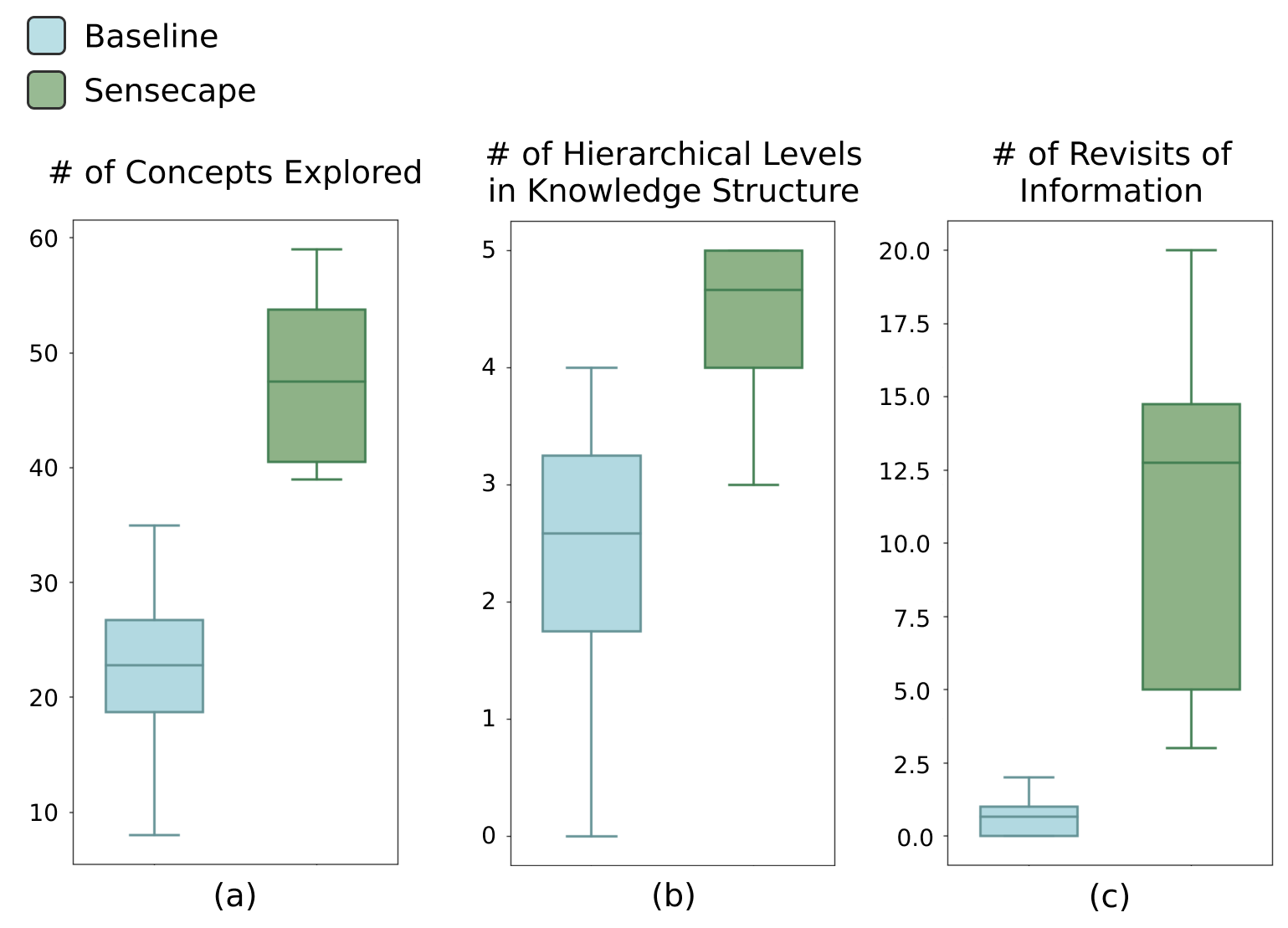
Abstract: People are increasingly turning to LLMs for complex information tasks like academic research or planning a move to another city. However, while they often require working in a nonlinear manner -- e.g., to arrange information spatially to organize and make sense of it, current interfaces for interacting with LLMs are generally linear to support conversational interaction. To address this limitation and explore how we can support LLM-powered exploration and sensemaking, we developed Sensecape, an interactive system designed to support complex information tasks with an LLM by enabling users to (1) manage the complexity of information through multilevel abstraction and (2) seamlessly switch between foraging and sensemaking. Our within-subject user study reveals that Sensecape empowers users to explore more topics and structure their knowledge hierarchically, thanks to the externalization of levels of abstraction. We contribute implications for LLM-based workflows and interfaces for information tasks.
Paper Prompts
Sign up for free to create and run prompts on this paper.
Top Community Prompts
Explain it Like I'm 14
Overview: What is this paper about?
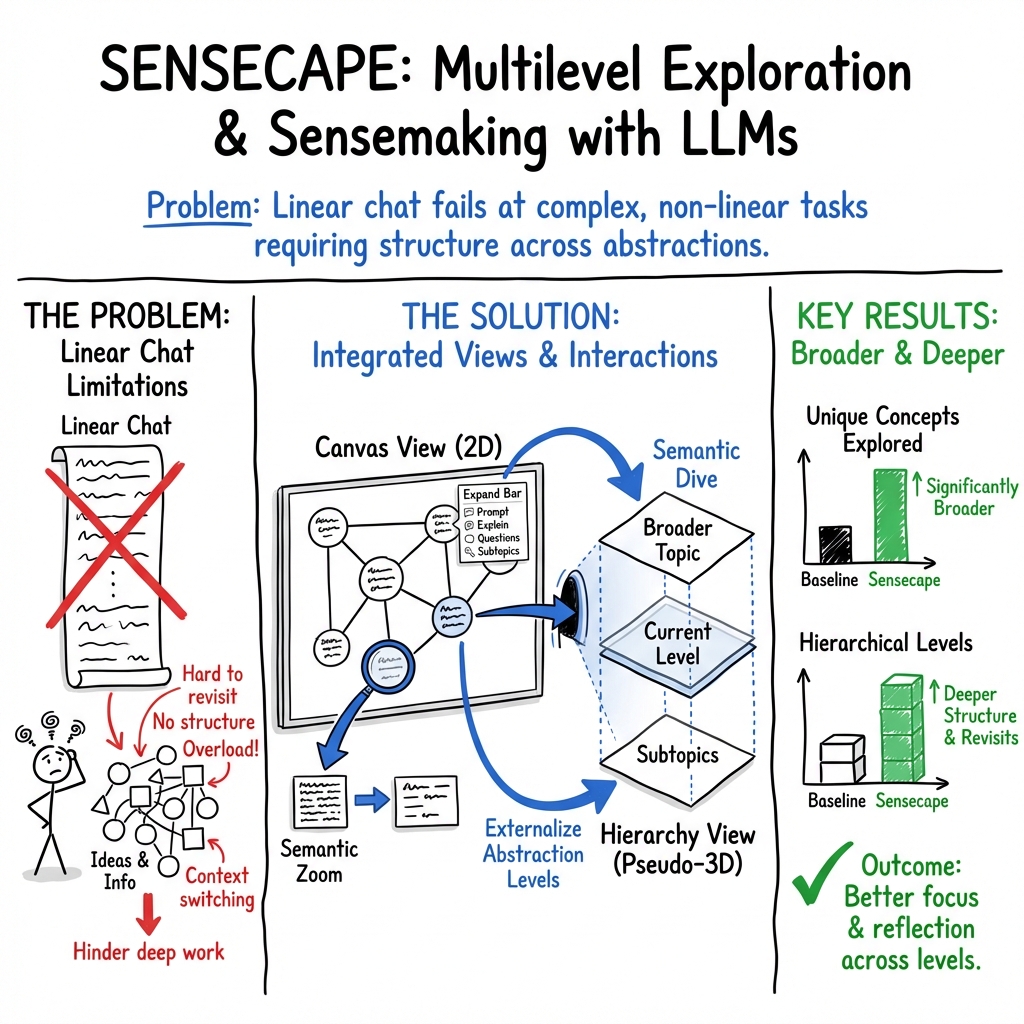
This paper introduces a new computer tool called Sensecape. It’s designed to help people use AI (LLMs like ChatGPT) to do complex research and planning. Instead of only chatting in a long, straight line (like scrolling through a text conversation), Sensecape lets you explore ideas in a flexible way: you can see the big picture, zoom into details, and organize your findings as you go. The goal is to make it easier to both find information and make sense of it.
The main questions the researchers asked
The researchers wanted to know:
- How can we improve AI tools so people can explore a topic at different levels, from big themes down to tiny details?
- Can a better interface help users switch smoothly between “finding information” and “organizing what it means”?
- Will people explore more and build better structures of knowledge when using Sensecape compared to a normal chat interface?
How the research was done
The Sensecape tool
Think of Sensecape like a smart, digital whiteboard with two ways to see your work:
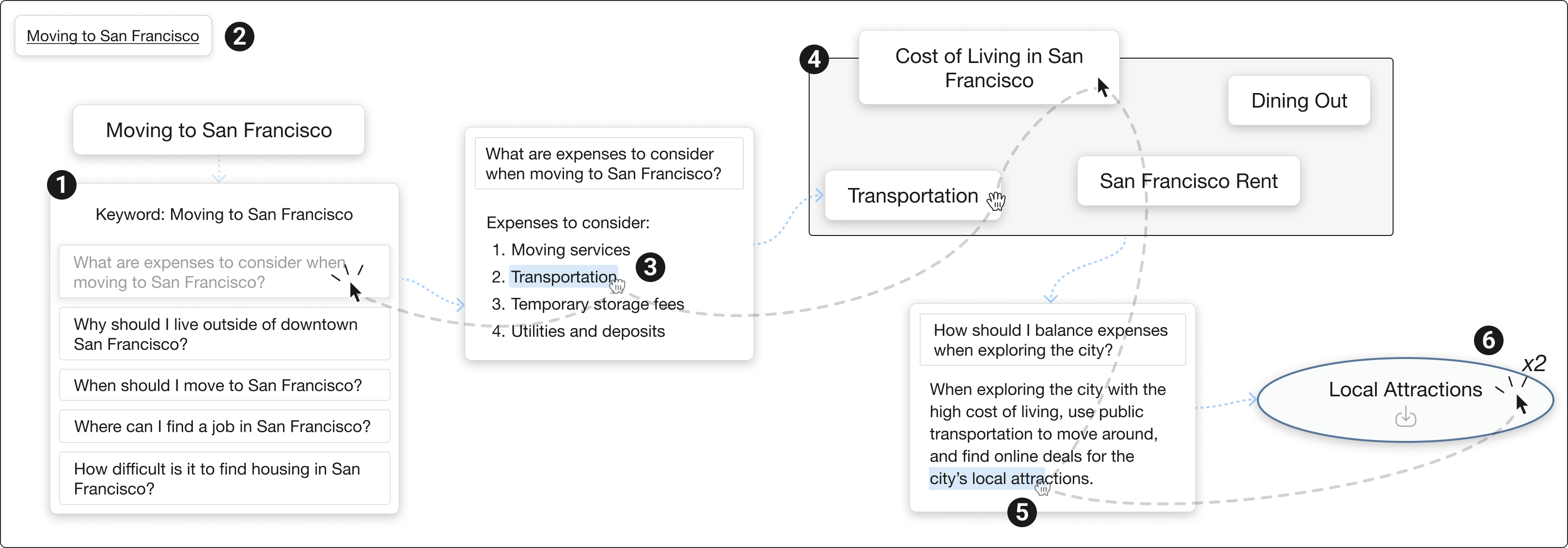
- Canvas view: This is a big, open space where you add notes (called “nodes”), group related ideas, and connect them. You can ask the AI to generate explanations, questions, and subtopics using an “expand bar.” You can also:
- Highlight useful bits of AI text and turn them into new nodes (like clipping a sentence into a sticky note).
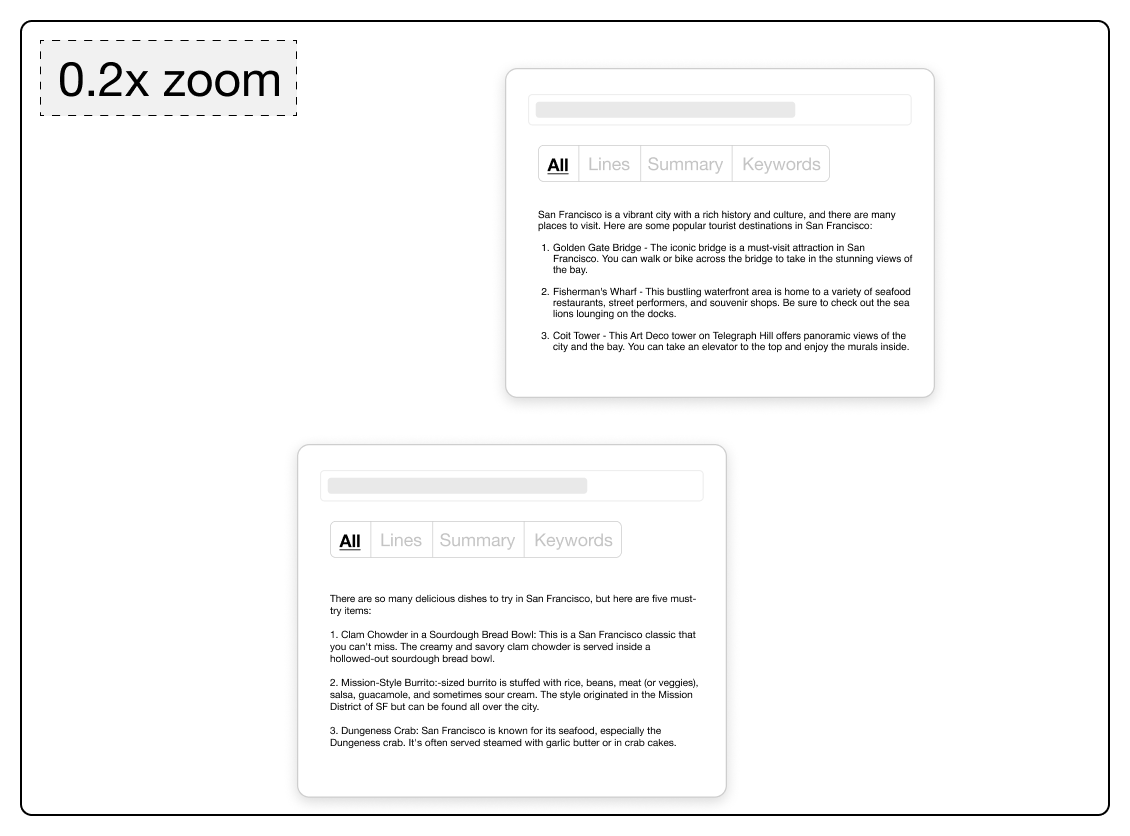
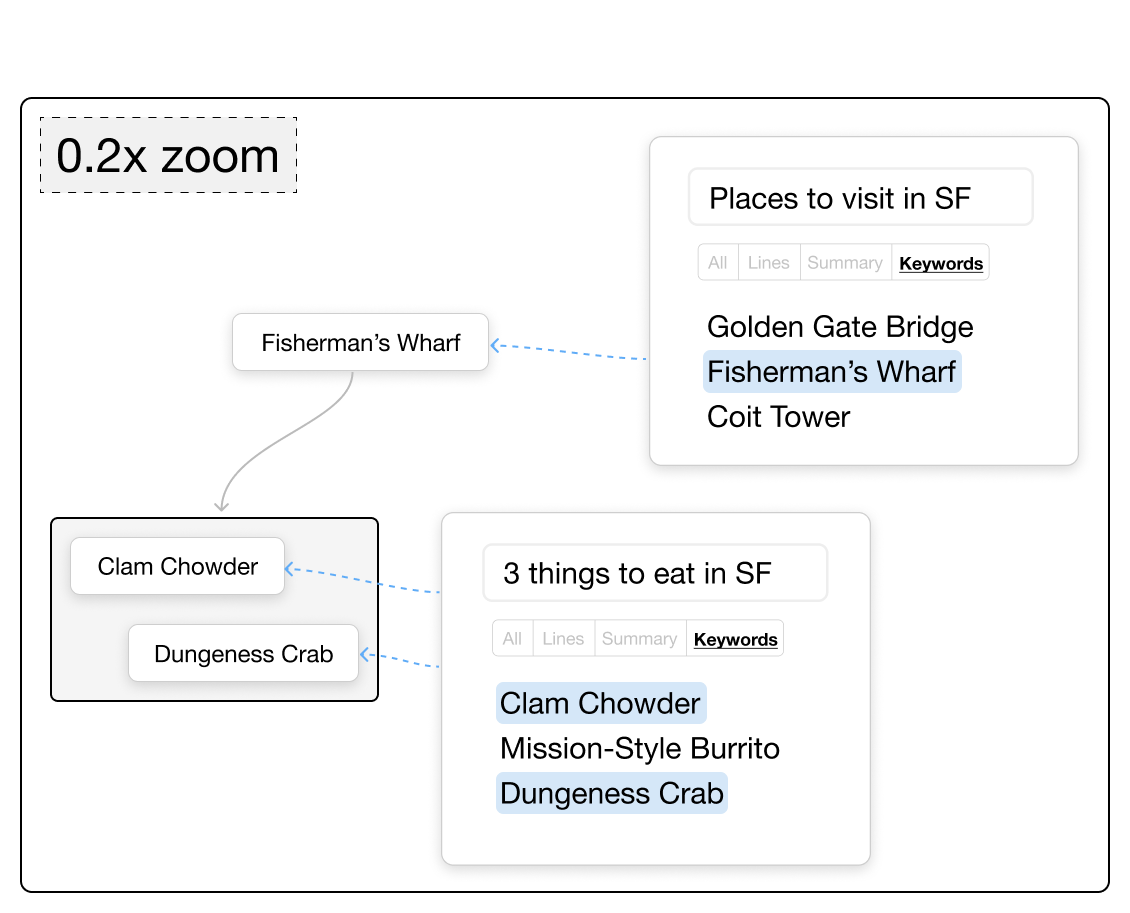
- Use “semantic zoom” to control how much text you see. Zoom out to see short summaries or keywords; zoom in to see the full details.
- “Semantic dive” on any node to jump into a new, clean canvas focused on that subtopic (like entering a portal into a more detailed world of that idea).
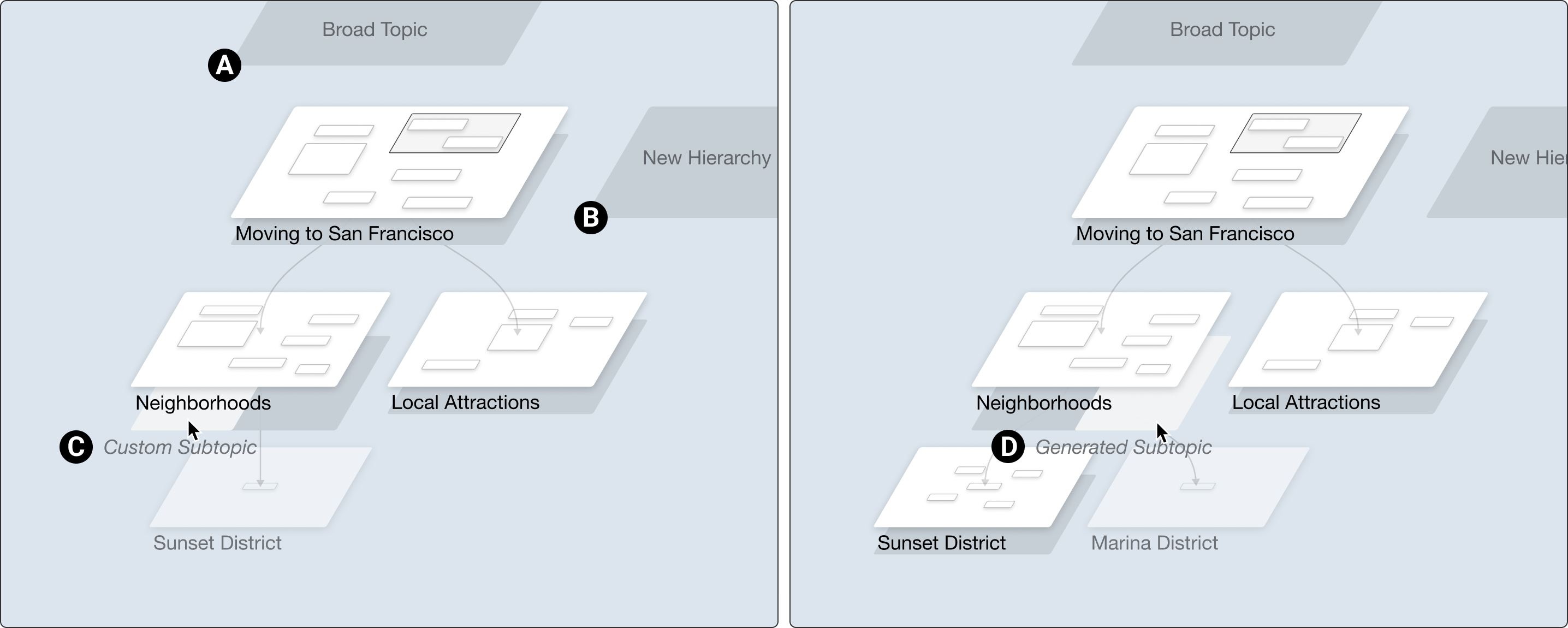
- Hierarchy view: This shows your canvases as a 3D-style map of topics and subtopics, arranged in levels. It’s like looking at a family tree of ideas: top-level big themes, middle-level categories, and bottom-level specifics. You can add broader topics above, subtopics below, and parallel topics beside your current work. This helps you see where you are and how everything connects.
These two views work together so you can switch between exploring and organizing, just like flipping between zoomed-out and zoomed-in views in a map app.
The user study
To test Sensecape, the researchers ran a “within-subject” study with 12 participants. “Within-subject” means each person tried both systems: Sensecape and a baseline interface that looked like a normal chat with a simple canvas.
- Tasks: Participants explored two complex topics (for example, “Impact of AI on the Future of Work” and “Impact of Global Warming on the Economy”). They used each system for about 20 minutes per topic.
- Comparisons: The baseline had a chat area and a basic note canvas side-by-side. Sensecape included all the special features (canvas + hierarchy, semantic zoom, expand bar, and more).
- What they measured: The team looked at how many prompts people used, how many nodes they created, and how many unique, relevant concepts they explored. They also checked how well people organized their ideas into a clear structure (like building a hierarchy).
What they found and why it’s important
The study showed that Sensecape helped people:
- Explore more topics and concepts, not just a single thread of conversation.
- Organize their knowledge hierarchically (big themes → subtopics → details), which made their understanding clearer.
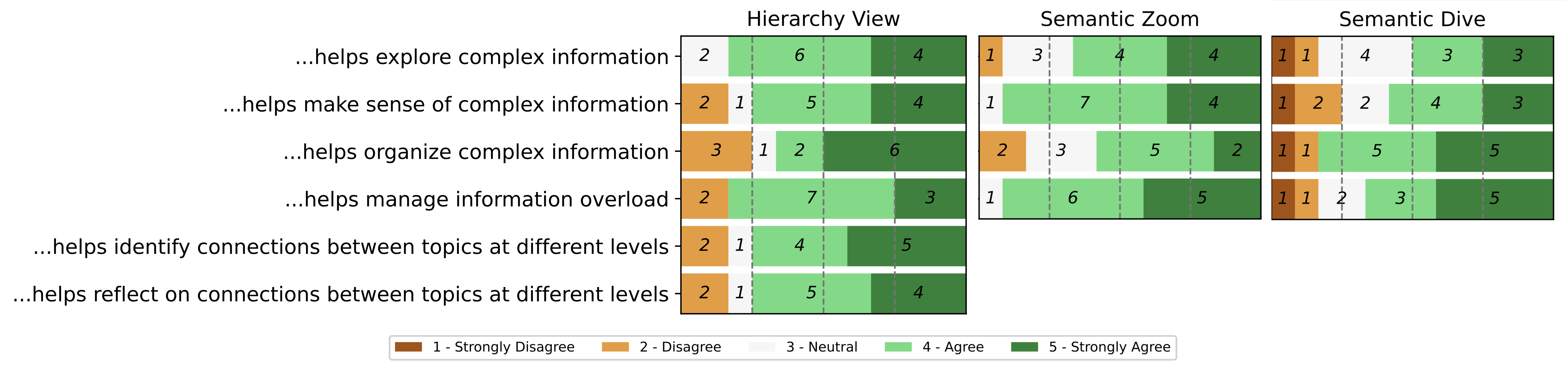
- Move smoothly between finding information (exploration) and making sense of it (organizing), thanks to features like semantic zoom, text extraction, and the hierarchy view.
Why this matters:
- Regular chat interfaces are “linear,” like reading a long text thread. That’s fine for simple questions, but it’s not great for big projects that need collecting, comparing, and structuring lots of information.
- Sensecape “externalizes” levels of abstraction—meaning it shows you both the big picture and the details at the same time, in a way your brain can easily manage.
- This reduces overload, avoids getting lost, and helps you build better plans, reports, and research summaries.
What this could change in the future
This research suggests that AI tools should be more than chat boxes. Interfaces that let you:
- See the big picture,
- Dive into details on demand,
- And organize information across levels,
can make complex tasks like school projects, trip planning, research, and decision-making faster and clearer. Sensecape points the way toward future AI systems that support how people actually think: switching between exploring new ideas and making sense of them, without losing track.
Knowledge Gaps
Below is a concise, actionable list of the paper’s unresolved knowledge gaps, limitations, and open research questions to guide future work:
- Internal validity confound: Sensecape features rely on GPT-4 while the chat relies on GPT-3.5-turbo; the Baseline lacks comparable GPT-4-powered features. Disentangle interface benefits from model quality via controlled ablations (same model across conditions; interface-only vs feature-only vs both).
- Short, lab-based evaluation: 12 participants from a single R1 university and 20-minute tasks limit ecological validity. Conduct longitudinal field studies over weeks with diverse populations and domain experts.
- Narrow task domains: Only two general topics (AI and climate economy) were used. Test across high-stakes and specialized domains (e.g., clinical, legal, finance, engineering design) with expert-judged outcomes.
- Sensemaking quality unmeasured: Current metrics emphasize quantity (prompts, nodes, concepts). Add expert ratings of knowledge structures (coherence, correctness, completeness), learning gains (pre/post tests), and task performance/transfer.
- Hallucinations and reliability: No mechanisms to detect, highlight, or remediate LLM errors, contradictions, or outdated content. Integrate grounding (retrieval-augmented generation), citations, provenance trails, and fact-check workflows; evaluate trust calibration.
- Missing provenance/citations: Summaries, subtopics, and questions are not tied to sources. Add source linking, quote-level provenance, and evidence tracking to support verification and reuse.
- Summarization/semantic zoom fidelity: Information loss and misrepresentation across zoom levels are unassessed. Measure fidelity (precision/recall of key ideas), cognitive impact, and allow user-editable summaries with version history.
- Cognitive load and attentional effects: Information overload is discussed but not measured. Use NASA-TLX, eye-tracking, and behavioral measures to quantify load and interruptions versus Baseline.
- Benefit of pseudo-3D hierarchy vs 2D alternatives: The unique contribution of the hierarchy view isn’t isolated. Compare against strong 2D baselines (mind maps, outliners, spatial canvases) and measure navigation efficiency, recall, and structural quality.
- Scalability and performance: Behavior with large hierarchies (hundreds of canvases/nodes) is unknown. Stress-test rendering, latency, and interaction times; add global search, cross-canvas linking, deduplication, refactoring, and collapse/expand controls.
- Collaboration: Multi-user sensemaking (awareness, conflict resolution, shared provenance) is not supported or evaluated. Add real-time collaboration features and study group dynamics and outcomes.
- Steering bias and anchoring: LLM-suggested questions/subtopics may narrow exploration. Quantify steering effects, diversify suggestions (counterfactuals, minority viewpoints), and enable user preference controls.
- Accessibility: No analysis of compatibility with screen readers, keyboard-only use, color contrast, or spatial/hierarchical navigation aids. Conduct accessibility audits and user studies with assistive technologies.
- Privacy/security: Handling of sensitive data, logging, and compliance (e.g., FERPA/GDPR) are unspecified. Define data retention, redaction, on-device inference or secure RAG, and admin controls.
- Cost and latency: Frequent GPT-4 calls (summaries, subtopics) raise cost/latency concerns. Evaluate caching, distillation, incremental summarization, and model routing policies for cost-quality tradeoffs.
- Reproducibility and model drift: LLM non-determinism and version updates threaten repeatability. Introduce prompt/version pinning, seeds, model cards, and release code/prompts/datasets for replication.
- Heterogeneous media: Support for PDFs, images, tables, code, and web pages (import, OCR, chunking, grounding) is absent. Add multimodal ingestion and test end-to-end workflows.
- Pipeline coverage: The paper notes dotted-line features “not yet implemented” in the foraging/sensemaking loop. Specify these gaps (e.g., retrieval, filtering, clustering, brushing/linking) and evaluate their added value when implemented.
- Learnability and errors: The learning curve, discoverability of features (semantic dive/zoom), and error recovery (undo/redo, versioning) weren’t studied. Instrument onboarding and measure time-to-proficiency and error rates.
- Comparison to strong baselines: No head-to-head with state-of-the-art LLM-augmented tools (Notion/Obsidian/Figma/Miro plug-ins). Benchmark against these under matched models and tasks.
- Uncertainty visualization: The interface does not expose confidence/uncertainty or disagreement across sources. Explore uncertainty cues, conflict highlighting, and evidence scoring.
- Personalization and adaptivity: Static “25 questions” may overwhelm or misfit user goals. Investigate user modeling to adapt suggestion volume, difficulty, and diversity over time.
- Structure evolution and maintenance: Fragmentation across canvases and duplication risks are unaddressed. Provide merge/refactor tools, roll-ups, structural linting, and guidance to improve hierarchy quality.
- Internationalization: Multilingual performance, cross-lingual sources, and locale-specific content are untested. Evaluate and adapt prompts and UI for non-English workflows.
- Ethical and IP issues: Use of LLM outputs without clear attribution raises ethical/IP concerns. Define attribution policies, licenses, and filters for disallowed content.
Practical Applications
Below is an overview of practical applications that flow from the paper’s findings and system innovations (multilevel abstraction, canvas/hierarchy views, semantic zoom/dive, LLM-powered expansion, and integrated foraging–sensemaking). Each item calls out sector(s), example tools/workflows, and key assumptions or dependencies.
Immediate Applications
- Academic literature reviews and knowledge synthesis
- Sector: Education, Academia
- Potential tools/products/workflows: A Sensecape-like plugin for Zotero/Notion/Obsidian/Overleaf to auto-suggest subtopics and questions for a research theme; hierarchical evidence maps for systematic reviews; thesis/topic scoping boards that transition from “foraging” (papers, notes) to “sensemaking” (argument trees, outlines).
- Assumptions/dependencies: Requires LLMs with citation support or integration with reference managers; quality checks to avoid hallucinations; institutional policies on AI use.
- Product strategy, opportunity mapping, and PRD planning
- Sector: Software, Product Management, Tech
- Potential tools/products/workflows: Confluence/Jira/Miro integrations to generate MECE-style issue trees, user needs maps, competitive landscape hierarchies; semantic zoom for “exec summary” vs. “engineering detail”; semantic dive to spin off sub-PRDs.
- Assumptions/dependencies: Access to internal docs/roadmaps via secure retrieval; data privacy and permissioning; prompt hygiene.
- UX research synthesis and insights repositories
- Sector: Software, Design/Research
- Potential tools/products/workflows: Import interview highlights (text/audio transcripts) → extract themes (nodes) → organize into a hierarchy with questions/subtopics suggested by LLM; semantic zoom for “themes vs. quotes” views; export to research readouts.
- Assumptions/dependencies: Accurate entity/theme extraction on noisy transcripts; privacy for user data; researcher oversight.
- Journalism and editorial planning
- Sector: Media
- Potential tools/products/workflows: Story-framing boards with multilevel angles (national, local, personal impact); automated question lists per angle; semantic zoom to move between headlines, decks, and body points; managing sources and claims across a hierarchy.
- Assumptions/dependencies: Strict source verification/provenance; editorial standards; legal review for sensitive topics.
- Consulting and policy brief development
- Sector: Consulting, Public Policy
- Potential tools/products/workflows: Hierarchical issue trees for policy options; pros/cons nodes; auto-generated subtopics to test blind spots; semantic dive for scenario analysis; export briefing memos at different levels of abstraction.
- Assumptions/dependencies: Clear source-tracking; client data protection; bias detection; human validation.
- Investment and market research workspaces
- Sector: Finance
- Potential tools/products/workflows: Company/sector research boards (drivers, risks, comps) with layered views for top-down vs. bottom-up; integrate RAG with filings/news; semantic zoom to produce “one-pager → full deck”.
- Assumptions/dependencies: Access to licensed data (e.g., Bloomberg/FactSet) and compliance policies; hallucination-resistant prompts; human review.
- Non-clinical healthcare knowledge work (education, admin, operations)
- Sector: Healthcare (non-regulated decision-making)
- Potential tools/products/workflows: Curriculum planning, policy/guideline mapping, operational workflow redesign with multilevel views (system → clinic → role → task); generate question checklists for process gap analyses.
- Assumptions/dependencies: No PHI in LLM prompts; institutional review; strong source provenance; avoid clinical decision use.
- Classroom learning and assessment of research skills
- Sector: Education (K–12, Higher Ed)
- Potential tools/products/workflows: Student assignments that require multilevel outlines (thesis → arguments → evidence); instructor dashboards that surface breadth vs. depth; semantic zoom to give feedback at appropriate granularity.
- Assumptions/dependencies: School policy on AI; scaffolding to prevent overreliance on LLMs; academic integrity controls.
- Enterprise knowledge base curation and onboarding
- Sector: Enterprise Software, Knowledge Management
- Potential tools/products/workflows: Confluence/Notion spaces that evolve from unstructured notes to hierarchical knowledge trees; expand bar for “explain, subtopics, questions” to fill gaps; semantic dive to spin off subspaces.
- Assumptions/dependencies: Secure retrieval to corporate content; change management for teams; version control and governance.
- Customer support content and FAQ design
- Sector: Customer Success, SaaS
- Potential tools/products/workflows: Generate and organize FAQ trees; link tickets to nodes; semantic zoom for agent vs. end-user views; auto-identify gaps in coverage through question generation.
- Assumptions/dependencies: Integration with Zendesk/Intercom; editorial oversight; reduction of hallucinations.
- Personal planning and life administration (daily life)
- Sector: Consumer Apps
- Potential tools/products/workflows: Travel/moving/wedding planning boards that cluster tasks, costs, and decisions; question prompts for hidden constraints; semantic zoom for “overview budgets vs. line items”.
- Assumptions/dependencies: Non-critical risk profile; info accuracy variability; cost/latency of LLM calls acceptable at consumer scale.
Long-Term Applications
- Collaborative, multi-user sensemaking at scale
- Sector: Cross-sector (enterprises, policy, research, media)
- Potential tools/products/workflows: Real-time multi-canvas collaboration with branching, merging, and versioning of hierarchies; provenance-aware change logs; role-based views by abstraction level.
- Assumptions/dependencies: Operational transforms/CRDTs for complex structures; conflict resolution UX; identity/permissions; scalability.
- Provenance-rich, verification-first LLMs for evidence-grounded nodes
- Sector: Healthcare, Finance, Policy, Legal
- Potential tools/products/workflows: Automatic citation/claim checking; nodes that carry their sources, confidence scores, and updates; compliance-ready audit trails.
- Assumptions/dependencies: Robust retrieval-augmented generation with source ranking; contracts for licensed content; regulatory alignment.
- Live, continuously updated knowledge hierarchies linked to enterprise data
- Sector: Enterprise, Compliance, Risk, Ops
- Potential tools/products/workflows: Nodes subscribed to data streams (alerts, KRIs, metrics); dashboards that roll up from leaf-node metrics to executive summaries via semantic zoom.
- Assumptions/dependencies: Event-driven integrations; schema mapping; alert fatigue management; data governance.
- Regulated decision-support (e.g., clinical pathways, safety cases)
- Sector: Healthcare, Aviation, Energy, Pharma
- Potential tools/products/workflows: Multilevel representations of guidelines (policy → pathway → step → evidence) with explainability and traceability; scenario testing via semantic dive.
- Assumptions/dependencies: Rigorous validation, approvals (e.g., FDA/MHRA); risk management; human-in-the-loop; domain-tuned models.
- Multimodal and code/data-native sensemaking environments
- Sector: Scientific Research, Engineering, Data/ML
- Potential tools/products/workflows: Nodes that contain dataframes, plots, code snippets, and model cards; transitions between “narrative” and “computational” views; integration with notebooks and pipelines.
- Assumptions/dependencies: Multimodal models; reproducibility tooling; secure compute and data access.
- AR/VR and spatial computing knowledge spaces
- Sector: Design, Engineering, Education, Robotics
- Potential tools/products/workflows: Immersive pseudo-3D hierarchies for complex system design reviews; spatial memory aids for large projects; gesture-based semantic zoom/dive.
- Assumptions/dependencies: Usable headsets; ergonomic interaction patterns; proven productivity benefits; accessibility accommodations.
- Agentic workflows that execute tasks from hierarchical plans
- Sector: Project Management, DevOps, Operations
- Potential tools/products/workflows: Agents that take leaf nodes (tasks) to schedule, draft documents, run tests, or trigger automations; managers operate at higher abstraction layers.
- Assumptions/dependencies: Reliable tool-use/agent frameworks; guardrails and approvals; security and auditability.
- Learning analytics that assess and scaffold sensemaking skills
- Sector: Education
- Potential tools/products/workflows: Dashboards that analyze breadth/depth, bias, and coherence of students’ hierarchies; targeted prompts to remediate gaps; research on learning outcomes.
- Assumptions/dependencies: Ethical analytics; data privacy; pedagogical validation and equity considerations.
- OSINT and threat/risk intelligence synthesis
- Sector: Security, Public Safety, Defense
- Potential tools/products/workflows: Automated ingestion of multi-source signals → de-duplication → node-level confidence with provenance; hierarchical threat models with scenario “dives”.
- Assumptions/dependencies: Robust source vetting; legal/ethical constraints; disinformation countermeasures.
- Participatory policy platforms for collective sensemaking
- Sector: Government, Civics, NGOs
- Potential tools/products/workflows: Citizens’ inputs clustered into a transparent hierarchy of concerns/ideas; multi-level summaries for policymakers; feedback loops to communities.
- Assumptions/dependencies: Moderation and bias mitigation; accessibility; process legitimacy and stakeholder buy-in.
Notes on cross-cutting feasibility factors
- LLM performance and cost: Latency and token costs influence user experience and scalability (especially for semantic zoom/summarize-on-zoom).
- Hallucinations and bias: High-stakes uses require verification layers, RAG with trusted sources, and human oversight.
- Privacy and security: Regulated sectors need on-prem or VPC-hosted models, redaction, and strict permissioning.
- Usability at scale: Hierarchy management, clutter reduction, and discoverability of “semantic dive/zoom” need careful UX for novices.
- Interoperability: Connectors to enterprise tools (Docs, Jira, Notion, LMS, BI, EHRs) are critical for adoption.
- Accessibility and inclusion: Keyboard navigation, screen-reader compatibility, and cognitive load considerations are essential for broad use.
Glossary
- Abstraction hierarchy: A hierarchical model that organizes concepts or system elements across multiple levels of abstraction to structure reasoning and navigation. "externalizing the abstraction hierarchy and enabling flexible navigation across these levels."
- Counterbalanced: An experimental design technique that varies the order of conditions across participants to control for order effects. "The order of the system and topics was counterbalanced, resulting in 4 (= 2 x 2) conditions, to minimize order bias."
- Exploratory search: An open-ended, learning-oriented search process used when tasks or goals are ill-defined and require investigation and synthesis. "Complex information activities are often the interleave of two major tasks: exploratory search and sensemaking."
- Externalization: The process of making internal knowledge structures explicit by encoding them into external representations or artifacts. "Externalization of multilevel abstraction for a more comprehensive and effective exploration of the information space for sensemaking;"
- Faceted search interfaces: Search interfaces that organize and filter results using multiple categorical dimensions (facets) to support navigation. "To help navigate relevant information returned by search engines, faceted search interfaces~\cite{hearst2006clustering} employed categorization or clustering of search suggestions and results."
- Foraging loop: The iterative phase of seeking, gathering, and filtering information within the broader information-foraging process. "two main loops --- foraging loop and sensemaking loop."
- Intraclass Correlation Coefficient (ICC): A reliability statistic that quantifies the consistency or agreement of measurements made by multiple raters. "Two raters coded the number of concepts explored and gathered and had an inter-rater reliability of 0.93 Intraclass Correlation Coefficient (2,1)."
- Inter-rater reliability: A measure of the degree of agreement among independent coders or evaluators. "Two raters coded the number of concepts explored and gathered and had an inter-rater reliability of 0.93 Intraclass Correlation Coefficient (2,1)."
- Levels of abstraction: Conceptual layers ranging from high-level summaries to detailed specifics, used to manage complexity and reasoning. "navigate across different levels of abstraction for multilevel exploration"
- Linking and brushing: An interaction technique that connects multiple coordinated views so selections or highlights in one view are reflected in others. "Linking and brushing technique involves linking multiple views of the same data, allowing users to see how changes in one view affect others."
- Multi-window approach: A user interface paradigm that organizes work into multiple windows/rooms to manage information and tasks across contexts. "The hierarchy view is inspired by our pilot studies and prior work on the multi-window approach~\cite{henderson1986rooms}."
- Occlusion: A visual effect where objects in a display obscure others along the line of sight, often complicating interaction in 3D interfaces. "allow objects to obscure one another (occlusion), they can make the interface cluttered and challenging to use"
- Pseudo-3D: A design technique that simulates aspects of three-dimensional layout without full depth complexity to reduce visual and interaction burdens. "we designed the hierarchy view to be pseudo-3D, with minimal use of depth and no canvas layers occluding one another."
- R1 university: A U.S. Carnegie Classification category denoting a doctoral university with very high research activity. "We recruited 12 participants (age: M = 26.9, SD = 4; gender: 4F, 7M, 1 Prefer Not to Say) from a local R1 university"
- Schematization: The process of organizing information into structured schemas or diagrams to support understanding and reasoning. "support the schematization (Fig.~\ref{fig:framework}D) of hierarchical relationships"
- Search-as-learning: A research perspective treating information search as a learning activity, measured by knowledge acquisition and structure building. "The search-as-learning and information retrieval communities have consistently used the number of domain-specific terms"
- Semantic dive: An interaction that moves into a deeper, subordinate canvas or context to explore a topic in detail. "Semantic dive: Users can (1) dive deeper into the topic"
- Semantic zoom: A technique where the semantic detail (e.g., keywords vs. full text) changes with zoom level, not just the visual scale. "Semantic zoom: Users can control the granularity of the information."
- Sensemaking: The cognitive and external process of organizing, structuring, and synthesizing information to form an understanding or answer complex questions. "This process of encoding information into external representations to answer complex questions is known as sensemaking"
- Systems thinking: A holistic analytical approach emphasizing interrelationships, hierarchies, and feedback within complex systems. "systems thinking"
- Think aloud: A usability and research method where participants verbalize their thoughts while performing tasks. "Throughout the study, participants were asked to think aloud."
- Visuo-spatial organization: Arranging information in space to leverage visual and spatial cognition for memory, pattern recognition, and problem solving. "This visuo-spatial organization can help not only reduce the cognitive overload"
- Within-subject study: An experimental design in which each participant experiences multiple conditions, enabling comparisons within the same individuals. "Our within-subject user study reveals that Sensecape empowers users to explore more topics and structure their knowledge hierarchically"